Best Fuel Tracking Apps for iPhone in 2026
Fuel prices remain one of the biggest day-to-day expenses for drivers. Whether you're a daily commuter trying to understand your monthly driving costs, a rideshare driver tracking expenses, or a road-tripper splitting fuel with friends — knowing exactly where your money goes matters.
With so many apps for tracking fuel and mileage, how do you know which one fits how you actually drive? We compared the top options available on iPhone in 2026 to help you find the right one.
Full disclosure: DriveStats is our app. We've aimed to be fair and accurate in this comparison — if anything looks off, let us know.
What Does "Fuel Tracking" Actually Mean?
Not all fuel tracking apps work the same way. Most apps in this space fall into three categories:
Receipt-based logging — Every time you fill up at the gas station, you type in how much fuel you bought and your current odometer reading. The app calculates your fuel economy (MPG or L/100km) for that tank. This tells you your average efficiency over a full tank — but it can't tell you what a specific trip cost. You filled up on Monday, drove all week, then filled up again on Friday — the receipt only shows the total for the tank, not how much Monday's commute versus Friday's road trip used. Examples: Fuelio, Drivvo, AutoLog.
OBD-II sensor reading — You plug a Bluetooth dongle into your car's diagnostic port and the app reads live data from your engine's sensors (like the Mass Air Flow sensor). This gives you highly accurate, real-time fuel consumption data. The trade-off: you need to buy and plug in hardware. Example: OBD Fusion.
Automatic fuel cost estimation — Your phone uses GPS and a physics-based vehicle model to estimate how much fuel each trip used, then calculates the cost. No receipts, no fill-up logging, no hardware. Example: DriveStats.
Several apps on this list also do automatic trip and mileage tracking — detecting drives in the background and logging your distance and route. DriveStats does this alongside fuel cost estimation, while apps like MileIQ and TripLog focus specifically on mileage tracking and reimbursement, without fuel cost data.
Which approach is right for you depends on what you want to know:
- "Am I getting worse gas mileage over time?" → Receipt-based logging
- "Exactly how much fuel is my engine burning right now?" → OBD-II sensor reading
- "How much did my commute cost me today?" → Automatic fuel cost estimation
- "How many miles did I drive, and can I deduct them?" → Mileage tracking
Comparison Table
| App | Method | Tracks | Cost per Trip | Auto-Detect | Privacy |
|---|---|---|---|---|---|
| DriveStats | Auto (GPS + physics model) | Fuel cost + miles | ✅ | ✅ | On-device |
| OBD Fusion | Auto (OBD-II sensor) | Fuel consumption | ❌ | ✅ | Local |
| Fuelio | Manual (receipt) | Fuel economy (MPG) | ❌ | ❌ | Cloud sync |
| Drivvo | Manual (receipt + odometer) | Fuel + expenses | ❌ | ❌ | Cloud sync |
| Motolog | Auto (GPS) + manual fuel | Miles + fuel + expenses | ❌ | ✅ | Cloud sync |
| MileIQ | Auto (GPS) | Miles only | ❌ | ✅ | Cloud |
| Everlance | Auto (GPS) | Miles + expenses | ❌ | ✅ | Cloud |
| TripLog | Auto (GPS / OBD-II) | Miles + expenses | ❌ | ✅ | Cloud |
Features as of June 2026. Check each app's page for the latest info.
DriveStats
Method: Automatic (GPS + physics model) · Tracks: Fuel cost per trip + miles · App Store · iOS only
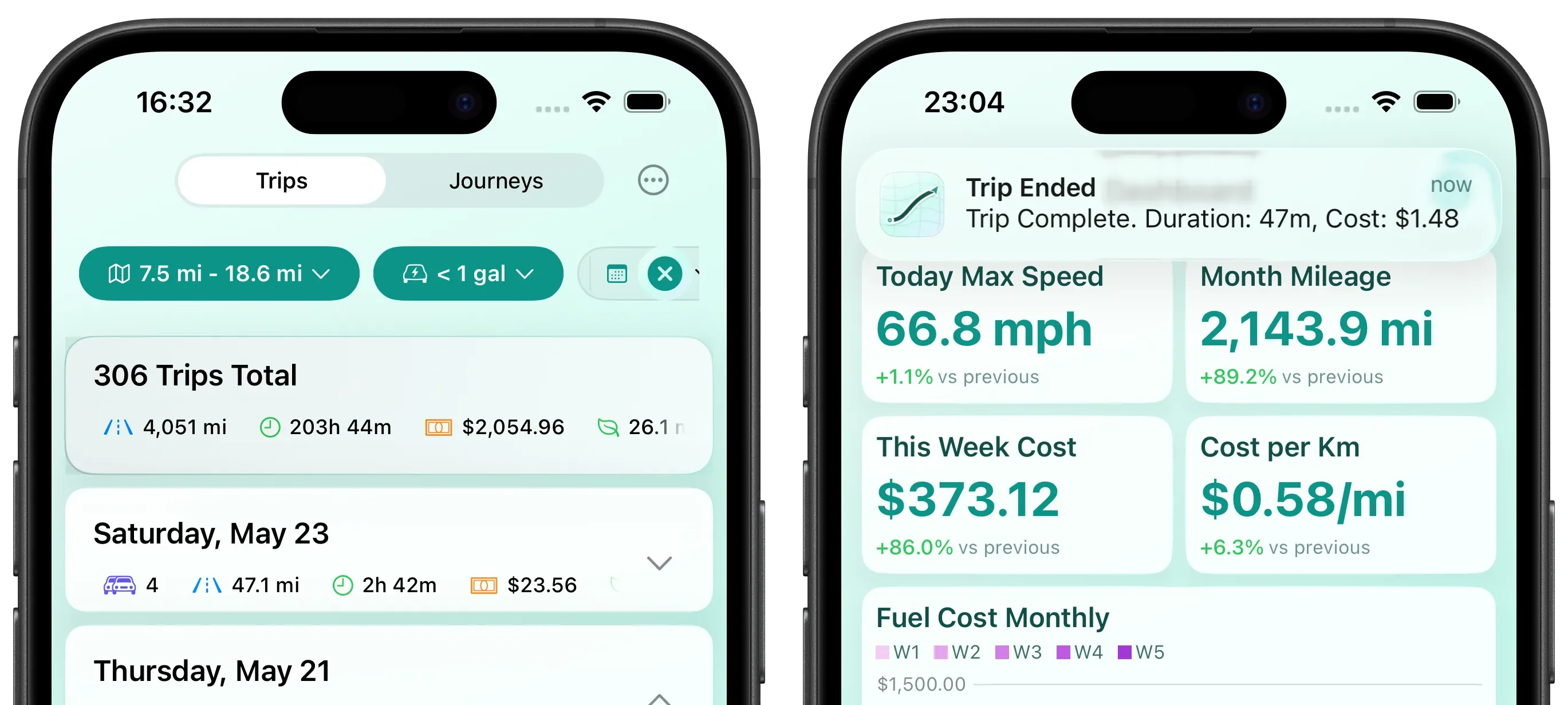
DriveStats takes a different approach from every other app on this list: it automatically estimates fuel costs for each individual trip using your iPhone's GPS and a physics-based vehicle model — no OBD-II dongle required, no manual input needed.
When you select your vehicle, the app builds a model calibrated to your car's physical parameters (weight, aerodynamics, rated fuel economy) and calculates fuel consumption from your actual driving patterns — acceleration, cruising speed, elevation changes. You set your fuel price per liter or gallon (and can update it each time you refuel), so the cost estimate reflects what you actually pay. After each drive, you get a push notification with the estimated cost.
Beyond fuel, DriveStats offers customizable dashboards with bar, line, and area charts, interactive maps with saved configurations, visited-location clustering, and a unified filter engine that works across the entire app. All data stays on your device — nothing is uploaded to cloud servers. Learn more about how the fuel model works →
Strengths: Automatic fuel cost per trip, no hardware needed, fully on-device (no cloud), customizable dashboards.
Limitations: iOS only, model-based estimates (not direct fuel injector measurement), no maintenance or fill-up logging.
OBD Fusion
Method: Automatic (OBD-II sensor) · Tracks: Real-time fuel consumption · Website · iOS + Android
For drivers who want exact data straight from the engine, OBD Fusion is the gold standard. It requires you to purchase and plug a compatible OBD-II dongle (Bluetooth or Wi-Fi) into your car's diagnostic port.
Once connected, it reads live data directly from your vehicle's sensors — including fuel economy, fuel usage, and multiple trip meters — to provide highly accurate, real-time fuel consumption data. It also doubles as a professional diagnostic tool to read and clear check engine lights, with customizable dashboards and automatic data logging when connected.
Strengths: Highly accurate fuel data from real engine sensors, multiple trip meters for fuel economy and usage, advanced vehicle diagnostics, customizable dashboards.
Limitations: Requires buying an OBD-II dongle (~$20-50), tracking only works when actively connected to the dongle, does not calculate monetary fuel costs per trip, interface can be overwhelming for casual users.
Fuelio
Method: Manual (receipt entry) · Tracks: Fuel economy (MPG) per tank · Website · iOS + Android
Fuelio is one of the most popular fuel tracking apps, with a clean interface for logging fill-ups and tracking MPG over time. You enter your odometer reading and fuel amount at each fill-up, and Fuelio calculates your fuel economy trends. It also includes community-reported gas prices and CarPlay support.
Strengths: Simple and well-designed, community gas prices, CarPlay support, cross-platform.
Limitations: Manual entry only — you have to log every fill-up yourself. No automatic trip detection or per-trip fuel cost estimation.
Drivvo
Method: Manual (receipt + odometer) · Tracks: Fuel, expenses, maintenance · Website · iOS + Android + Web
Drivvo goes beyond fuel logging to offer full vehicle expense management. Track fuel, maintenance, parking, tolls, and other costs all in one place. You manually log each fill-up with fuel quantity, price, and odometer reading, and Drivvo calculates your cost per distance and fuel efficiency. It's used by over 2 million people and includes fleet management features for businesses.
Strengths: Comprehensive expense tracking beyond just fuel, fleet management, web dashboard, cross-platform.
Limitations: Manual entry — no automatic fuel estimation. More focused on expense logging than driving analytics.
Motolog
Method: Automatic (GPS / Bluetooth) + manual fuel logging · Tracks: Miles, fuel fill-ups, expenses · Website · iOS + Android + Web
Motolog combines automatic trip detection with manual fuel and expense logging. It can detect drives automatically via GPS or by pairing with your car's Bluetooth, then classifies trips as business or personal. You manually log fuel fill-ups and vehicle expenses, and it calculates fuel economy including separate city/highway figures. It also includes service reminders, IFTA distance reports, shared vehicle access, and import from other apps.
Strengths: Automatic trip detection via GPS or Bluetooth, city/highway fuel economy breakdown, shared vehicle access, cross-platform with web dashboard, import from other apps.
Limitations: Fuel logging is still manual (fill-up entry, not automatic estimation). No per-trip fuel cost estimation.
MileIQ
Method: Automatic (GPS) · Tracks: Miles (business/personal) · Website · iOS + Android
MileIQ is designed for mileage tracking. It automatically detects drives in the background and logs them as business or personal miles. It's popular with freelancers and small business owners who need mileage logs.
The free tier covers 40 drives per month. Unlimited tracking requires a paid subscription.
Strengths: Reliable automatic drive detection, business/personal classification, simple swipe interface (left for personal, right for business).
Limitations: No fuel cost tracking — it tracks miles, not fuel. Cloud-based (your location data is uploaded). Paid subscription for unlimited use.
Everlance
Method: Automatic (GPS) · Tracks: Miles + expenses · Website · iOS + Android
Everlance combines automatic mileage tracking with expense management. It detects trips in the background, lets you categorize them as business or personal, and also tracks expenses like tolls and parking. Used by over 4 million drivers.
Strengths: Automatic trip detection, expense management, mileage reports.
Limitations: No fuel cost per trip. Free tier limited to 30 trips/month. Some users report missed trips. Subscription required for full features.
TripLog
Method: Automatic (GPS / OBD-II / Bluetooth) · Tracks: Miles + expenses · Website · iOS + Android
TripLog offers automatic mileage and expense tracking with an unusually generous free tier — unlimited automatic trip detection at no cost. It supports multiple tracking modes (GPS, Bluetooth, OBD-II) and includes expense management with OCR receipt capture and bank/credit card feeds. Designed for both individual drivers and fleets.
Strengths: Unlimited free automatic tracking, expense management with OCR receipt capture, multiple tracking modes, fleet features.
Limitations: No fuel cost estimation. Some users report accuracy issues with trip detection. More focused on mileage for reimbursement than driving cost analysis.
Which App Is Right for You?
There's no single "best" app — it depends on what you need:
Want to know what each trip costs? DriveStats is the only app on this list that automatically estimates fuel costs for individual trips without requiring any hardware. If you want to see that your Monday commute cost $2.05 but Friday gridlock cost $2.80 on the same route — that's what DriveStats does.
Just want to log fill-ups and track MPG? Fuelio and Motolog are both solid choices. Fuelio has a cleaner interface and CarPlay support. Motolog adds automatic trip detection and city/highway fuel economy breakdown.
Need to track mileage for business? MileIQ is the most established option, though TripLog offers unlimited free tracking if you don't want to pay a subscription.
Want full vehicle expense management? Drivvo covers fuel, maintenance, parking, tolls, and more — useful if you want a complete picture of vehicle ownership costs.
Want precise engine-level fuel data? OBD Fusion reads directly from your car's sensors via an OBD-II dongle — the most accurate option if you're willing to buy the hardware.
DriveStats is developed by Wan Lutfi and is available on the App Store. All information about other apps is based on their public App Store listings and websites as of June 2026 and may have changed since publication.
See what every trip costs
Auto trip tracking, fuel cost estimates, dashboard charts — 100% private, on your device.
Download App